
New Player Offer
100% up to EUR 500 + 200 Free Spins
How to Register
Complete each step below to create your account correctly and activate your welcome package without delays.
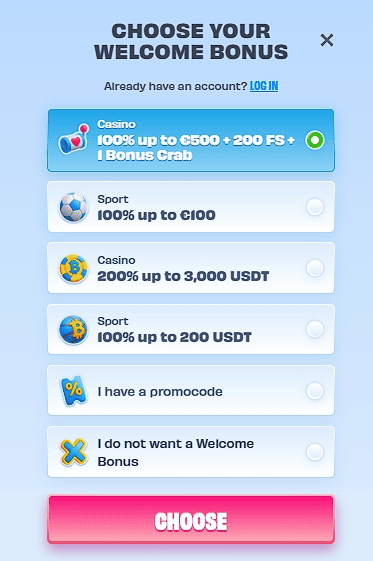
1. Start
Click the "REGISTER" button on the main page and choose your welcome bonus.
Warning: If you skip bonus selection now, you may not be able to claim the welcome offer later without support intervention.
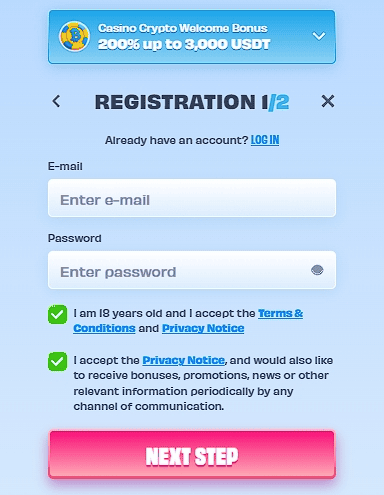
2. Data
Enter your email address and create a secure password for your new account.
Warning: Use your real legal name and address. Any mismatch with your ID documents will cause KYC rejection and withdrawal delays.
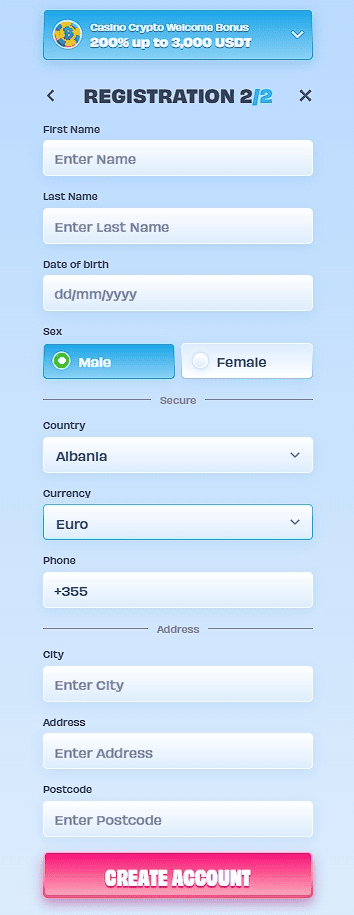
3. Profile
Fill in the player questionnaire: full name, date of birth, residential address, and phone number. Select your account currency.
Warning: Currency selection is usually permanent. Changing it later requires a support ticket and can delay your first withdrawal.
- Confirmation: Follow the link from the email to confirm your email address.
Warning: Email can take 10–15 minutes. Check spam/promotions before requesting a resend. - Deposit: Make a deposit and activate the welcome bonus.
Warning: Use the same method you plan to withdraw with. Some e-wallets (Skrill/Neteller) may exclude you from the welcome bonus.
How to Log In
Access your OnlySpins account quickly using your email and password, or log in with PlayID.
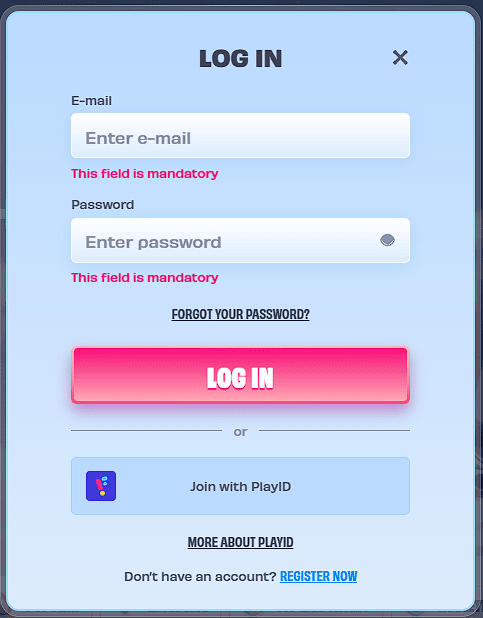
Log In to Your Account
- Open: Click the "LOG IN" button on the main page to open the login screen.
- E-mail: In the E-mail field, enter your registered email address.
- Password: In the Password field, enter your password. Use the eye icon to toggle visibility if needed.
- Confirm: Click the large pink LOG IN button to access your account.
Note: Both the E-mail and Password fields are mandatory. If you forgot your password, click the FORGOT YOUR PASSWORD? link below the password field to reset it.
Alternative: You can also log in by clicking the Join with PlayID button for a faster login experience.
Registration Troubleshooting Table
| Stage | What to Prepare | Most Common Mistake | How to Fix |
|---|---|---|---|
| Registration | Active email, real details | Mismatch with future KYC docs | Use exact legal name and address as in your ID |
| Currency Selection | Preferred fiat or crypto | Choosing then wanting to switch | Decide before registering based on your deposit/withdrawal plan |
| Verification | Passport/ID + proof of address | Blurry scans or old documents | Clear color photos; documents must be under 3 months old |
| First Deposit | Min. amount + correct method | Depositing without selecting bonus | Select the welcome bonus during registration |
| Bonus Activation | Meet wagering requirements | Playing wrong games | Check bonus terms in your account immediately after deposit |
Common OnlySpins Registration Problems & How to Fix Them
Most guides only show the happy path. Here are real issues players face and how to solve them.
Email confirmation never arrives
Check your spam or promotions folder. Wait 10–15 minutes and use the “Resend” option on the login page. If it is still missing, contact live chat and provide your registered email address.
Documents rejected during KYC
The most common reasons are blurry photos, address mismatch, or utility bills older than 3 months. Upload high-quality color scans with good lighting and ensure the document matches your registered address.
Welcome bonus not credited after deposit
Make sure you selected the bonus during registration and met the minimum deposit requirement. Provide the transaction ID to support — most cases are resolved within a few hours.
OnlySpins Login & Register: Is It Right for You?
Yes, register now if: You want the welcome bonus, plan to play slots or live casino, and are ready for standard KYC verification.
Be cautious if: You use a VPN, plan large withdrawals, or live in a grey-area GEO where gambling regulations are unclear.
Consider alternatives if: You are looking for minimal or no verification casinos. Note that these are becoming rarer due to regulations.
After Registration: Your First 24 Hours Checklist
OnlySpins Login FAQ: Real User Objections
Q: What if the confirmation email never arrives?
A: Check your spam or promotions folder. Wait 10–15 minutes and use the “Resend” option on the login page. If it is still missing, contact live chat and provide your registered email address.
Q: Why were my documents rejected?
A: The most common reasons are blurry photos, address mismatch, or utility bills older than 3 months. Upload high-quality color scans with good lighting and ensure the document matches your registered address.
Q: Bonus not credited after deposit?
A: Make sure you selected the bonus during registration and met the minimum deposit requirement. Provide the transaction ID to support — most cases are resolved within a few hours.
Q: Is registration safe?
A: The site uses SSL encryption and holds a Curacao license. The biggest risk is not security but verification delays caused by data mismatches during signup.